











|
 |
 |
|
Reviews & Ratings:
|
||
|
|
||

Our price: | R 1,729.00 | (incl. VAT) |


 top
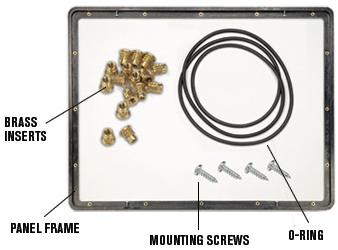
topKit includes:
- O-ring, special adhesive package, and threaded brass inserts
Installation:
1. The frame must be correctly oriented prior to installation. Check for the model identifier and the word "front" (i.e.1450 front). The frame is to be installed with these characters closest to the front of the case. (If the frame is installed in reverse, the mounting screws will protrude through the case as they are oriented to match the external ribs).2. To install the brass inserts, place the frame face down (model identifier facing down, see step 1). Place the non-shoulder small end of the insert into the hole and push in with a Phillips screwdriver until fully seated on the shoulder.
3. To secure the frame to the case, install the frame into the case until fully seated on the internal ribs. Next, insert a mounting screw (supplied with kit) into the hole and press firmly as you turn the screwdriver to start self-tapping. Continue to turn until fully seated or use a 90° drill motor.
4. Install the o-ring into the channel between the frame and the case. The o-ring must be fully seated. Install your custom panel. Your panel should completely cover the o-ring for maximum fluid and dust resistance. Install the screws (into brass inserts) by hand, DO NOT APPLY PRESSURE. The fit of the insert to frame was designed for easy installation without specialized tools (by hand). Excess pressure will push the brass inserts back out the other side.
top| General | |
| Type | Frame Insert |
| Compatibility | Protective Case 1450 |
top